MyWisconsin ID to replace current WAMS login process
The State of Wisconsin is moving to a single personal account for each customer to securely access participating Wisconsin government resources. Your new MyWisconsin ID account will replace multiple state logon processes and reduce the number of IDs and passwords in use within the state. The State of Wisconsin and WisDOT are committed to providing secure access to online systems for customers.
Who needs a MyWisconsin ID
Every customer who previously accessed WisDOT systems using a WAMS ID will need a MyWisconsin ID. Each person will have a single MyWisconsin ID to access various state services. If you already have a MyWisconsin ID due to interactions with other state agencies, you will use that same MyWisconsin ID for WisDOT’s systems after they are migrated.
How to create a MyWisconsin ID account
Tips for a successful registration
- Registration is time sensitive – Once information is entered, registration must be completed within 2 hours, or the account will be deleted.
- By default, registration includes multi-factor authentication (MFA) setup – See below for more about MFA.
- Only one MyWisconsin ID is needed to access applications with WisDOT and any other state agencies using MyWisconsin ID.
-
MyWisconsin ID Frequently Asked Questions (FAQs)
When
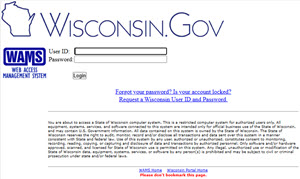
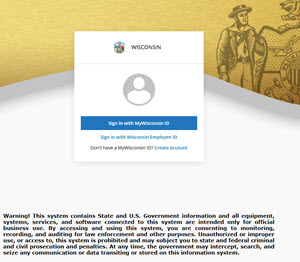
Migration of the applications from WAMS to MyWisconsin ID will continue through the end of 2026. Until all applications have been migrated to the new MyWisconsin ID, you may need to use the old login credentials.
|
Continue using your WAMS login information when you see this screen: |
Begin using your new MyWisconsin ID login information when you see this screen: |
 |  |
Multi-Factor Authentication (MFA)
To secure your account, you will need to set up Multi-Factor Authentication (MFA). MFA adds an additional layer of protection by requiring both your password and a second form of verification—such as a code sent to your phone—to help prevent unauthorized access to your account. Choose
one of four MFA options when creating your account. If you select an option that uses an app (e.g., Google Authenticator), download the app before you begin.
Questions? Visit the MyWisconsin ID Account Service Desk for
support or please call the MyWisconsin ID Account Service Desk at 608-471-6667.